phpwarden documentation
Find and contain PHP vulnerabilities across your engine, Composer dependencies and WordPress — ranked by real-world exploitation (CISA KEV + EPSS), not just CVSS.
Version 2.6.0 · zero runtime dependencies · works offline.
What is phpwarden?
phpwarden is a command-line tool (with an optional hosted dashboard) that tells you which parts of your PHP stack have known, currently-exploited vulnerabilities — and which to fix first. It looks at the whole stack, not one slice:
| Surface | What it checks | Command |
|---|---|---|
| Engine | the PHP interpreter version itself (e.g. 8.3.0 vs the fixed 8.3.36) | phpwarden scan |
| Dependencies | your Composer packages, from composer.lock | phpwarden deps |
| WordPress | WordPress core, plugins and themes in an install | phpwarden wordpress |
| File integrity | WordPress core and plugin files against the official wordpress.org checksums | phpwarden integrity |
| Your code | the PHP you wrote, for injection bugs and WordPress/Laravel handlers left open | phpwarden code |
| Live site | what a running site shows from outside (read-only) | phpwarden probe |
| One verdict | all of the above, ranked together with the reason for each item | phpwarden assess |
| WAF rules | ModSecurity / nginx rules built from the feed's exploit signatures | phpwarden rules |
| Shield | exploits of the vulnerabilities this site has, blocked inside PHP (log-only until you promote a rule) | phpwarden shield |
| Live logs | access/error logs for signs of an attack in progress | phpwarden detect |
| Runtime | a daemon that contains a PHP-FPM worker attack as it happens | phpwarden-guard |
Two ideas make it different from a plain CVE scanner:
- Exploitation-first. Findings are ranked by whether attackers are actually using them right now (CISA KEV + EPSS), not just by CVSS severity. The thing being exploited today floats to the top — see Key terms.
- Offline & self-contained. The vulnerability feed is bundled in the download. It runs with no account and no network — results never leave the machine unless you choose to send them to a dashboard.
How the pieces fit: run a scan on a server (or in CI) → read the ranked findings right there, or
add --report-to to push them to your dashboard for history, trends,
alerts and webhooks. The CLI, the bundled feed, free weekly feed updates and a
one-project dashboard are free (the engine is Apache-2.0). The paid plans add the maintained feed, rebuilt twice
a day, more projects, weekly live checks and alerts.
Quickstart
Three steps. No config and no network needed — the feed ships inside the download.
1 · Get phpwarden onto the machine
The single-file build runs anywhere with Python 3.8+ — nothing to install:
# one self-contained file — download it, or copy it to the server, and run it
$ curl -LO https://phpwarden.io/phpwarden.pyz
$ python3 phpwarden.pyz scan
The checksum is at phpwarden.pyz.sha256. The file is the current release.
In a PHP project? composer require --dev phpwarden/phpwarden puts it in
vendor/bin/phpwarden — no pipx needed. See Install for every option.
2 · Scan the machine you're on
$ python3 phpwarden.pyz scanIt detects your PHP version, SAPI and OS, checks them against the bundled feed, and prints findings ranked by real-world exploitation — most urgent first. A tiny example:
phpwarden 2.6.0  php=8.3.0 sapi=fpm os=linux  feed=2026.11.14.2 (bundled-community)
  3 exposed, 1 possible, 4 cleared; worst=critical
  exploited in the wild: CVE-2026-109618, CVE-2026-109619

  [EXPOSED ] CVE-2026-109618  critical (CVSS 9.2)  [KEV, EPSS 100% (p100)]
      Upload-progress use-after-free and remote process-memory disclosure
      fixed in: 8.3.36
Don't know these words yet? Key terms explains EXPOSED, KEV and EPSS in a line each.
3 · (Optional) send results to a dashboard
To collect scans from many servers in one place, add --report-to with a project token
(how to get one):
$ python3 phpwarden.pyz scan --report-to https://app.phpwarden.io/v1/reports --report-token pw_live_xxx0 when nothing applies and
non-zero when the host is exposed, so the same command works in a cron job or a CI pipeline that should
fail on a finding. See CI integration.Install
Pick whichever fits your environment. Every format ships the same zero-dependency engine.
| Method | Command | Best for |
|---|---|---|
| Composer (recommended) | composer require --dev phpwarden/phpwarden | PHP projects → vendor/bin/phpwarden (needs Python 3.8+ on the box) |
| Single file (zipapp) | python3 phpwarden.pyz scan | No install, any host with Python 3.8+ |
| pipx | pipx install phpwarden | Python-tooling machines (needs pipx) |
| Homebrew | brew install oroma-alfred/tap/phpwarden | macOS or Linux with Homebrew |
| pip in a venv | python3 -m venv v && v/bin/pip install phpwarden | Inside a project env |
| Docker | docker run --rm phpwarden/phpwarden scan --version 8.3.10 --sapi fpm --os linux | Containers and pipelines (Docker Hub, amd64 + arm64). Mount a project to scan it: -v "$PWD:/src:ro" … deps /src/composer.lock |
pip install? phpwarden is live on
PyPI, but on modern
macOS / Debian / Ubuntu a system-wide pip install is blocked by
PEP 668
(externally-managed-environment). Use pipx install phpwarden (it manages an
isolated env and puts the command on your PATH), or a virtualenv. The single-file
zipapp needs nothing installed — python3 phpwarden.pyz scan on any host with Python 3.8+.Key terms, in plain English
These few words show up in every scan. Here's what each one means and why it matters.
| Term | What it means |
|---|---|
| Exploitation-first | The ranking phpwarden uses: a vulnerability attackers are actually using right now is shown above a "scarier-sounding" one that nobody is exploiting. You fix the real risk first, not the biggest number. |
| KEV | Known Exploited Vulnerabilities — CISA's official list of CVEs confirmed to be exploited in the wild. A KEV badge means "this is being used in attacks today." Fix these first. |
| EPSS | Exploit Prediction Scoring System (by FIRST) — a 0–100% estimate of how likely a CVE is to be exploited in the next 30 days. p96 is the percentile (higher = more urgent than most CVEs). |
| CVSS | The traditional 0–10 severity score. Useful, but it says how bad a bug could be, not whether anyone is using it — which is why phpwarden sorts by KEV/EPSS first and uses CVSS only as a tie-breaker. |
| SAPI | How PHP is being run: fpm (behind a web server — most production sites), cgi, or cli (command line). Some vulnerabilities only apply to one SAPI, so phpwarden factors it in. |
The three verdicts
Every advisory the engine checks ends up in one of three buckets for your host:
| Verdict | Meaning | Do what? |
|---|---|---|
[EXPOSED] | Confirmed to apply to your exact version, SAPI and OS. | Fix it — use the fix: version shown. |
[POSSIBLE] | Might apply, but phpwarden can't be sure — usually because the PHP version is unknown, or it depends on how your app uses a feature. | Investigate; pin the version (--version) to get a definite answer. |
[CLEARED] / [OK] | Does not apply — you're on a fixed version, or it's gated to an OS/SAPI you don't run. | Nothing. This is the good outcome. |
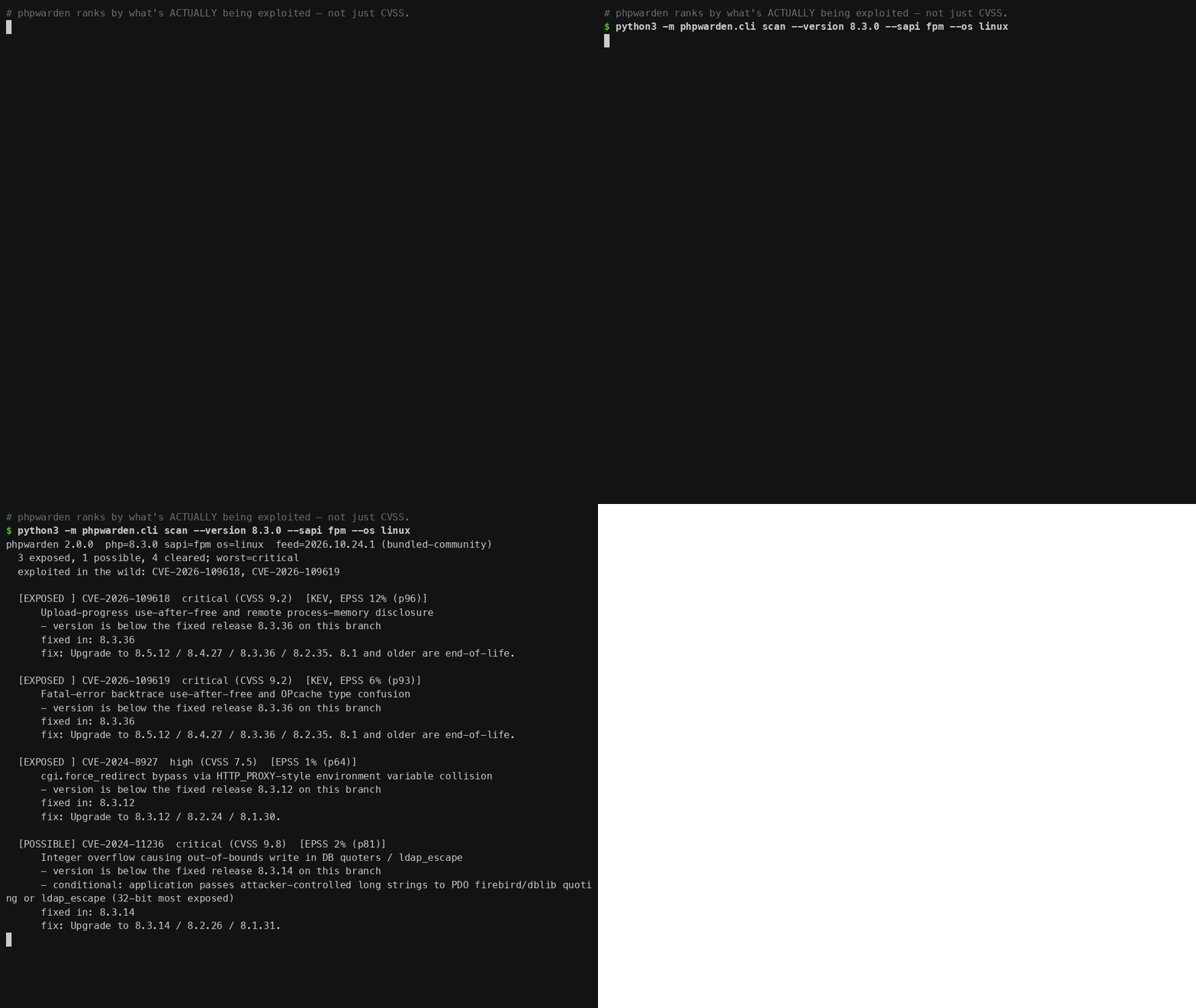
Scan the host scan
What it does: checks the PHP interpreter on this machine (its version, SAPI and OS) against the engine CVEs in the feed. When to use it: on any server running PHP, in cron, or in CI. With no flags it auto-detects everything; you can also assess a version you don't have installed.
$ phpwarden scan                          # detect local php + SAPI + OS
$ phpwarden scan --version 8.2.20         # assess a version you don't run locally
$ phpwarden scan --sapi fpm --os linux    # override detection
$ phpwarden scan --json # machine-readable output| Flag | Meaning |
|---|---|
--php PHP | Path to the php binary (default php). |
--version V | Assess an explicit version instead of the local one. |
--sapi {fpm,cgi,cli} | Override the detected SAPI (affects exposure scoring). |
--os {linux,windows,darwin} | Override detected OS. |
--json | Emit JSON (feed into report or your own tooling). |
--format {text,json,sarif} | Output format; --json is --format json. See SARIF output. |
--report-to URL | POST results to a phpwarden ingest URL. |
--report-token TOKEN | Project ingest token (or env PHPWARDEN_REPORT_TOKEN). |
php=8.3.0 sapi=fpm os=linux is what phpwarden
detected, then a tally (3 exposed, 1 possible, 4 cleared) and the in-the-wild list. If you see
php=unknown, it couldn't find PHP — pass --version so verdicts can be definite
instead of [POSSIBLE]. See Key terms for the verdicts.| Exit code | Meaning (shared by every command) |
|---|---|
0 | Nothing applies; clean. |
1 | Exposed (scan), vulnerable packages or components (deps, wordpress), signature hits (detect), tampered files (integrity), high or critical findings (code, probe), something to act on now or this week (assess). |
2 | Possibly exposed (scan only). |
3 | PHP version unknown (scan only). |
4 | Input error: missing or unreadable file, bad lockfile, site unreachable, cannot write --out. |
5 | The upload to --report-to failed on an otherwise clean run. |
64 | Usage error: unknown flag or missing argument. |
Composer dependencies deps
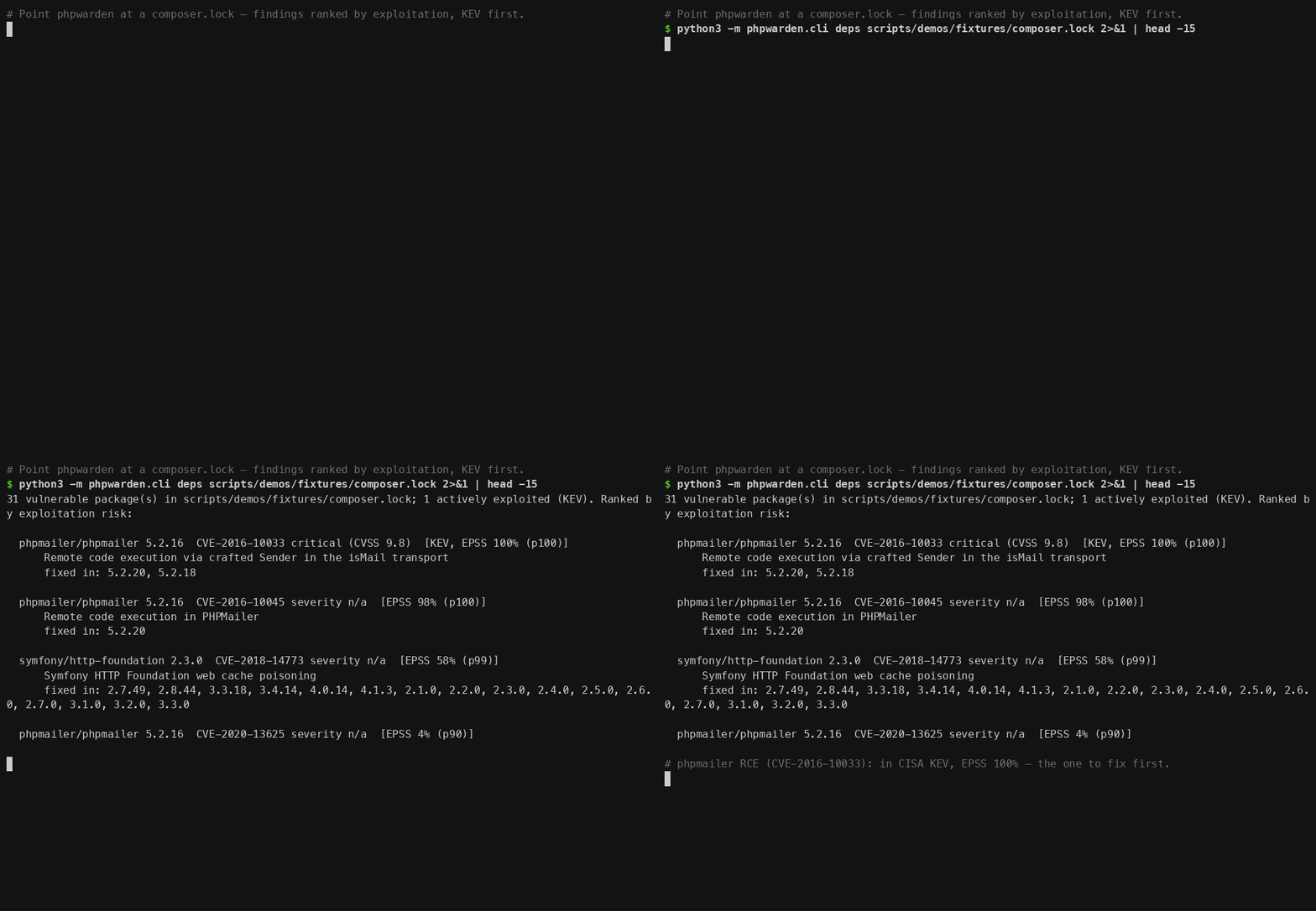
Watch it on a real Laravel composer.lock (30 seconds).
What it does: reads your composer.lock (the file with exact installed versions) and
checks every package against ~8,800 Composer advisories. When to use it: anywhere your app's
PHP libraries live — locally, in CI on every push, or on the server. It never touches the network or
installs anything; it just reads the lockfile.
$ phpwarden deps composer.lock
$ phpwarden deps composer.lock --json --report-to $URL --report-token $TOKEN
Reachability. deps also looks at your own source (the lockfile's folder, or --project DIR)
to see whether each vulnerable package is actually referenced: used, unreferenced,
dev-only or unknown. Known-exploited findings stay on top; within the rest, packages your
code uses rank above ones it never touches. --no-reachability skips this step.
WordPress wordpress
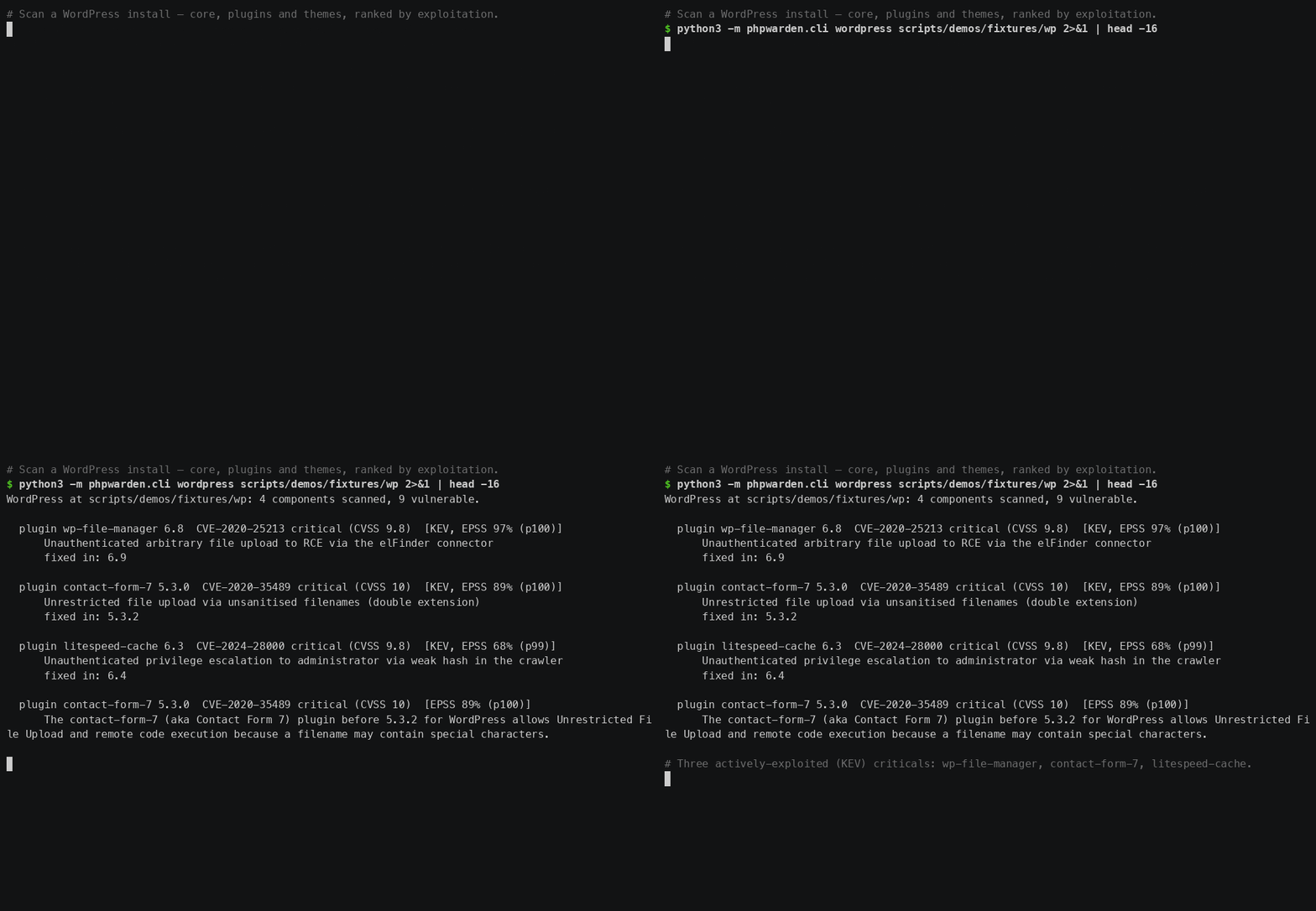
What it does: points at a WordPress install, reads the WordPress core version and the version of every plugin and theme (from its
header, falling back to readme.txt) and checks them against ~12,300 WordPress core,
plugin and theme advisories. When to use it: on any server hosting
WordPress — plugins are the most-attacked part of the PHP world, so this is often where the KEV findings
are. Give it the folder that contains wp-content/.
$ phpwarden wordpress /var/www/html
$ phpwarden wordpress /var/www/html --host shop-prod --json --report-to $URL --report-token $TOKEN
--host labels the result in a multi-server fleet report.
File integrity integrity
What it does: checks whether a WordPress site's code has been tampered with. It compares WordPress core and every wordpress.org plugin with the official checksums, lists files that do not belong, flags PHP files in the uploads folder, and checks changed files for common backdoor code. When to use it: after a suspected compromise, or on a schedule across every site you host. It needs network access to wordpress.org.
phpwarden integrity /var/www/html
phpwarden integrity /var/www/html --json     # machine-readable; exit code 1 if anything is tampered
phpwarden integrity /var/www/html --no-plugins        # core and uploads only
phpwarden integrity /var/www/html --locale de_DE      # a non-English install (default en_US)
What it is not: a signature-based malware scanner. It cannot verify premium plugins or themes, which have no public checksums, and it says so in its output by listing every component it could not verify. Moving from Wordfence CLI? See the command-by-command table.
WordPress plugin agent
The phpwarden WordPress plugin reports a site's WordPress version, PHP version, plugins and themes to your
dashboard twice a day and after every change, with no CLI or CI setup. It is on WordPress.org:
wordpress.org/plugins/phpwarden. In WordPress go to Plugins → Add New, search
phpwarden and install it (watch the 2-minute video), or with WP-CLI run wp plugin install phpwarden --activate. Then paste the project token under
Settings → phpwarden, check the consent box (nothing is sent until you do) and click Send report now.
With WP-CLI: wp phpwarden activate TOKEN --consent. The plugin is report only: it never changes anything on
the site. Agencies that want to update plugins and themes from the dashboard use the
agency edition instead (install one or the other, not both), where
remote updates are a separate setting on the site and off by default. The plugin is not a firewall or a malware scanner, and it
runs alongside Wordfence or Patchstack.
Live site check probe
What it does: looks at a running site from the outside, the way a visitor's browser would, and reports what it can see: files that should not be public, debug and admin endpoints left open, the WordPress, plugin, theme and PHP versions the site gives away, and missing transport and header protections. The versions it finds are matched against the feed, so the result is ranked like every other phpwarden report: known exploited first, then EPSS, then severity. When to use it: on a site you look after but cannot install anything on, or as an outside check next to wordpress and deps.
$ phpwarden probe https://example.com --print-token   # how to prove the site is yours
$ phpwarden probe https://example.com                 # active checks once verified
$ phpwarden probe https://example.com --passive       # homepage response only
$ phpwarden probe https://example.com --format sarif > probe.sarif
Proving the site is yours
The active checks only run on a site you have shown you control. --print-token prints a token for
that host and three ways to publish it. Any one is enough:
- A DNS TXT record on the host:
phpwarden-verify=<token> - A file at
/.well-known/phpwarden-verify.txtcontaining the token - A tag in the homepage
<head>:<meta name="phpwarden-verify" content="<token>">
The token is derived from a random secret kept in ~/.phpwarden/probe-secret on the machine that runs
the probe, so it is stable for that machine and host; pass --token to use one issued elsewhere. The DNS
method needs dig on the machine. Without verification, probe stays in
passive mode: it requests the homepage, looks for the ownership file, and stops. Passive mode still reports
header and TLS findings and any version the homepage itself gives away.
What the active checks look for
| Group | Examples |
|---|---|
| Exposed files | .env, .git/HEAD, composer.lock, phpinfo.php, wp-config.php backups, SQL and zip backups, debug.log, storage/logs/laravel.log |
| Debug and admin endpoints | Laravel Ignition, Telescope and Horizon, the Symfony profiler, Adminer, phpMyAdmin, xmlrpc.php, the WordPress REST user list, /server-status |
| Versions | WordPress core, plugins and themes from the page and its asset URLs; PHP from response headers. Each is matched against the feed. |
| Transport and headers | HTTPS redirect, HSTS, CSP, clickjacking protection, nosniff, Referrer-Policy, cookie flags, TLS certificate expiry, directory listing in uploads |
Every hit is confirmed by its content, not by a 200 status: a site that answers 200 for every URL
produces no false "exposed file" findings. Secrets are never copied into the report. An exposed
.env is reported with the variable names only. An exposed composer.lock is also scanned
for vulnerable packages.
$ phpwarden probe https://example.com
phpwarden probe 2.6.0 -- https://example.com
mode: active  ownership: verified (well-known)  requests: 33
fingerprint: WordPress 6.4.2; 1 plugins; frameworks: wordpress

  HIGH     [EXPLOITED] WordPress core 6.4.2: unauthenticated local .php file inclusion ... CVE-2026-87902
  CRITICAL [EXPLOITED] plugin litespeed-cache 6.2: Unauthenticated privilege escalation ... CVE-2024-28000
  CRITICAL Exposed .env file -- 3 variables exposed (names only): APP_KEY, DB_PASSWORD, APP_DEBUG
  CRITICAL Exposed .git repository -- repository HEAD readable (ref: ...)
  MEDIUM   WordPress XML-RPC enabled -- XML-RPC enabled
  LOW      Missing Content-Security-Policy -- no CSP header
  ...
summary: 3 critical, 4 high, 4 medium, 4 low, 1 info; 3 known exploited
What it will never do
- GET and HEAD only. No POST, no payloads, no fuzzing, no brute force. It does not try to exploit anything; it reads what the site already serves. The one exception is the optional signed-in check, which may send a single login form POST to your own verified site.
- A fixed list of paths, plus one random path to learn what the site's "not found" page looks like. It does not crawl links.
- A request budget. At most 60 requests per run by default (
--max-requests), a pause between requests, an 8-second timeout each, 90 seconds in total, and at most 256 KB read per response. - It stays on the host you named. A redirect to another hostname is not followed.
- It identifies itself. The User-Agent is
phpwarden-probe/<version> (+https://phpwarden.io/probe). - No unverified scanning. On a site you have not verified, it makes the homepage request and the ownership-file check, and nothing else.
Exit code 1 if anything is high or critical or known exploited, 0 otherwise,
4 if the URL is not http(s) or the site cannot be reached. Limits worth knowing: a version read from
outside is only as good as what the site reveals, and a PHP version from a header cannot tell which SAPI or OS is
in use, so engine CVEs that depend on those are marked "(possibly)". For a definite answer run
scan on the host. The live check is not a general web application scanner; for SQL injection
or XSS testing of a running app, use a tool built for that, such as OWASP ZAP.
Your own code code
What it does: analyses the PHP you wrote, not your dependencies, as a whole program, for bugs that are almost
always real: request data reaching eval, a shell command, an SQL string, unserialize,
an include path or a redirect; WordPress AJAX and REST handlers that change data without a
capability or nonce check; Laravel, Symfony and WordPress routes that change data with no authorisation check;
mass assignment; raw Blade and Twig output; hardcoded secrets; weak hashing of passwords. There are 89 rules,
88 on by default (--all-rules adds the noisier opt-in one). The aim is few findings that are worth
reading, so when it is unsure it stays quiet. When to use it: in CI next to
deps, or before you ship a plugin or theme.
$ phpwarden code .                          # the project in the current directory
$ phpwarden code src/ --min-severity high   # only high and critical
$ phpwarden code . --rule sql-wpdb --rule unserialize-tainted
$ phpwarden code . --format sarif > code.sarif
$ phpwarden code --list-rules
$ phpwarden code .
[CRITICAL] User input reaches unserialize() plain.php:13:9 (unserialize-tainted, CWE-502)
$data = unserialize($_COOKIE['prefs']);
fix: Use json_decode(), or unserialize($x, ['allowed_classes' => false]) for trusted formats only.
[CRITICAL] User input reaches system() plain.php:10:1 (cmd-system, CWE-78)
system("ping -c 1 " . $cmd);
fix: Avoid the shell; if unavoidable, escape each argument with escapeshellarg() and whitelist values.
...
Summary: 7 critical, 29 high, 12 medium, 4 lowEach finding that crosses functions or files carries a trace: where the request data came from, each
function and file it passed through, and the dangerous call. With --format sarif the trace is a
SARIF codeFlow, which GitHub code scanning shows step by step.
| Category | Rules | Category | Rules |
|---|---|---|---|
| SQL injection | 10 | Command injection | 10 |
Other injection (LDAP, XPath, mail headers, extract, …) | 8 | Code execution | 7 |
| Path traversal and file operations | 7 | SSRF | 6 |
| Crypto and TLS | 6 | XSS (incl. raw Blade/Twig, HTML responses) | 5 |
| WordPress handlers and options | 4 | Configuration | 4 |
| Missing authorisation, IDOR | 3 | Open redirect | 3 |
| Hardcoded secrets | 3 | XXE | 3 |
| CSRF | 2 | File inclusion | 2 |
| Deserialization | 2 | Laravel | 2 |
| Mass assignment | 1 | Second-order injection | 1 |
Every rule, with its CWE and fix, is on the rule reference page.
How it decides. It parses every PHP file in the project into a syntax tree and builds a model of the
whole program: namespaces and use imports, Composer autoloading, classes, inheritance, traits, and a
call graph. It works out the types of variables (from new, typed parameters and properties, return
types and docblocks) so that $repo->find($id) resolves to the right method. Then it follows
request data ($_GET, $_POST, cookies, headers, php://input, Laravel,
Symfony and WordPress request objects) through assignments, array keys, string building, function and method
calls, includes and class properties, across files, and reports when that data reaches a dangerous call without
passing through the right safeguard. A safeguard only counts for what it protects against: esc_html()
clears a value for output but not for SQL; $wpdb->prepare() and intval() clear it
for SQL. Data written to the PHP session or to a WordPress option or meta key with a fixed name is followed to
where it is read back (second-order). If your composer.lock contains a package with a known
deserialization gadget chain, an unserialize() finding is raised and says which package. Flows only an
administrator can reach are reported one level lower and labelled requires-authenticated-admin.
Framework models. Laravel: routes and controllers as entry points, request input, query builder raw
methods, Blade {!! !!}, mass assignment of the whole request to models with $guarded = [] (or through forceFill/forceCreate), routes with no
auth middleware or policy check, CSRF exclusions. Symfony: #[Route] controllers,
Doctrine queries built from strings, Twig |raw, controllers that persist without an access check.
WordPress: AJAX and REST handlers, $wpdb, options and meta, nonce and capability checks.
How it compares. On the same pinned apps, it found 8/8/7 of the 8 DVWA vulnerability types at low/medium/high (Psalm 5/3/4, Semgrep 3/2/3, Snyk Code 3/2/2) and all 11 Mutillidae ones (Psalm 8, Semgrep 4, Snyk Code 4), with 7 high findings on all of WordPress core and none on Laravel or Symfony (Semgrep 173 on WordPress; Psalm 442, 590 and 985; Snyk Code 51, 5 and 55). Where it loses, and how each tool was run, is in the published comparison.
Silencing a finding. Put // phpwarden-ignore: <rule-id> on the same line or the line
above. vendor/, node_modules/ and test directories are skipped; add
--include-tests to scan tests too.
Through the database and callbacks. Request data written to a table (raw SQL, $wpdb, Eloquent,
the query builder, Doctrine) and later read from the same table is followed to where it is printed or queried,
so stored XSS and second-order SQL injection are reported with the write and the read in the trace. Callbacks
passed to array_map, usort, preg_replace_callback, add_filter
and similar, $f() and first-class callables are followed too.
Limits. Tables are matched by name, not by row, so a read is linked to every write to that table. Table names
are resolved when they are fixed in the code: literals, class and global constants (const,
define()), Laravel config('file.key') from config/*.php, simple Symfony
parameters, concatenation of those, $wpdb->prefix + name, $wpdb->posts and the
other core tables, and an Eloquent $table; a table name built from run-time data (or
env()) is not matched. Calls
whose target is only known at run time from data (not a literal or a resolved callable), and very long chains,
are not followed. It is not a type checker and does not
replace PHPStan for general bugs. Treat a clean run as "none of these patterns", not as "this code is safe". The
earlier, faster single-pass engine is still available with PHPWARDEN_CODE_ENGINE=tokens (75 rules).
Exit code 1 if anything is high or critical.
One ranked verdict assess
What it does: combines every view phpwarden has of one site into a single ranked list, and says why each
item is where it is: what is installed (composer.lock, WordPress), what is in your code,
what the live site shows from outside, and what is already arriving in the access log. Give it
whichever of those you have; it states which views were checked and which were not.
$ phpwarden assess /var/www/shop --url https://shop.example --log /var/log/nginx/access.log
phpwarden assess 2.6.0  target=/var/www/shop  feed=2026.11.14.2
  views used: installed, code, outside, attacked
  3 act now, 6 this week, 13 scheduled, 3 watch

ACT NOW
  /.env    [critical]
      Exposed .env file
      - visible from outside: variables: APP_KEY, DB_PASSWORD
      - already fetched: the access log shows 2 successful request(s) for this path from 2 client address(es);
        treat every secret in it as leaked and rotate it
      fix: Block dotfiles in the web server and rotate every secret in the file.
  phpmailer/phpmailer 5.2.16  CVE-2016-10033  [critical]
      Remote code execution via crafted Sender in the isMail transport
      - installed: phpmailer/phpmailer 5.2.16
      - exploited in the wild: on CISA's Known Exploited Vulnerabilities list
      - reachable: your code references this package
fix: Upgrade to 5.2.20| Tier | What puts an item there |
|---|---|
| Act now | Exploited in the wild (CISA KEV, or EPSS of 50% or more) or already being attacked here, and present in a way that is reachable; or a file holding secrets is downloadable from outside. |
| This week | Critical or high and reachable; exploited elsewhere but apparently unreachable here (dev-only or unreferenced), with that stated; critical or high findings in your own code or from outside. |
| Scheduled | Medium, or high but unreachable. |
| Watch | Low and informational, such as a missing header. |
| Flag | Meaning |
|---|---|
path | Project or site root: composer.lock, a WordPress install, your PHP code. Optional if you give --url. |
--url URL | Also check the live site from outside (the same rules as probe, including proof of ownership). --token overrides this machine's ownership token. |
--probe-json FILE | Use a saved probe --json result instead of --url. |
--log ACCESS_LOG | Also check what is being attacked. Exploit attempts for vulnerabilities you do not have are listed in one line at the end, not as findings. |
--no-code | Skip the scan of your own PHP code. |
--out FILE | Save this assessment as JSON, to compare against later. |
--baseline FILE | Compare with an earlier --out file: what is fixed and verified, still open, and new. |
--json | Machine-readable output. |
Proof of fix. Save an assessment with --out, fix things, then run again with
--baseline. An item is reported as fixed and verified only when the view that found it ran
again and no longer finds it. If that view was not run the second time (no --url, say), the item is
listed as "not re-checked", never as fixed; an exposed file needs a full, ownership-verified re-check.
Exit code 1 if anything is in act now or this week, otherwise 0.
Signed-in check (optional)
Some versions only show to a signed-in user: WordPress prints its version in the dashboard footer and lists every plugin with its version on the plugin page, and plugins that load only for members are invisible from outside. Give probe a session and, after ownership is verified, it repeats a few read-only requests signed in.
phpwarden probe https://example.com --cookie 'wordpress_logged_in_abc=...'
phpwarden probe https://example.com --cookie-file cookies.txt     # keeps the value out of shell history
--cookie takes name=value (repeatable, or several joined with ;);
--cookie-file takes the same lines or a Netscape cookies.txt; --header 'Name: value'
adds a header such as a bearer token. On the dashboard you can instead save a test account's login (login URL, the
form's username and password field names, username, password): phpwarden then sends one form POST to that URL
to obtain the session cookie.
Use a low-privilege test account, created for this purpose (on WordPress, a Subscriber is enough to load the dashboard). Never use your own administrator login. If the account can open the plugin list (an administrator-level page), probe reports that as a finding so you can lower its role.
What it checks, exactly:
- The homepage again, signed in: PHP, WordPress, plugin and theme versions that appear only for signed-in users.
- On WordPress:
/wp-admin/(is the session accepted, the version in the footer) and/wp-admin/plugins.php(plugin slugs and versions, when the account may see that page). - Every version found is matched against the feed like any other; findings that came from the signed-in pages are listed in a "Versions visible only when signed in" entry.
It does not crawl, submit any other form, or test what the account is allowed to do. The rules for signed-in requests:
- They only go to the verified site: same scheme, host and port. A redirect anywhere else is refused, so the cookie is never sent to another host.
- GET and HEAD only, apart from the single login POST (which must point at the verified site).
- Nothing that looks like logout, sign-out, delete, remove, reset, deactivate or uninstall is requested, nor any URL carrying a nonce or CSRF token, even as a redirect target.
- Cookie, header, username and password values are never printed: they are removed from the text, JSON and SARIF output, the notes and any error message.
- The same request budget and rate limits apply.
Live check on the dashboard
Every project has a Live check page: the hosted version of probe, run from phpwarden's
server so there is nothing to install. Enter the site address, prove the site is yours (a DNS TXT record, a file
under /.well-known/, or a meta tag: the page shows the exact value), and run it.
- Without proof of ownership it only reads the homepage response. The full check needs proof, and ownership is confirmed again on every run.
- Since the previous check shows what is fixed and verified (no longer visible from outside) and what is new. A homepage-only run cannot verify a fix that needed the full check.
- How often: by hand on every plan, at most once every 10 minutes per project and 30 runs a day per account. On Pro and Team, verified sites are also checked automatically every week.
- What is kept: the last 20 runs per project. Secret values are never stored, only the names of exposed variables. Removing the site address deletes its history.
- Private and internal addresses are refused; it only checks sites on the public internet.
- Signed-in check (optional): on a verified site you can save a session cookie or a test account's login (see Signed-in check for exactly what it checks). It is stored encrypted, never shown again (the page only says "saved, set on" a date), never written to logs, results or the activity log, and is used only on runs where ownership is proven again. One click deletes it; it is also deleted when you change or remove the site address, and with the project or your account. Use a low-privilege test account.
Shield: protection inside PHP shield
What it does: a single PHP file loaded before your application checks each request for exploit attempts
against the exploited vulnerabilities this site actually has, scoped to the vulnerable component's own
entry points, plus four generic checks that are almost never legitimate (a php:// or
phar:// wrapper in a parameter, a php.ini directive assigned in the query, a serialized object when a
package with a known gadget chain is installed, traversal toward wp-config.php or .env).
It logs until you switch rules to blocking. It is not an edge firewall: it does not handle DDoS, bots or TLS.
Rate limits (2.4.0). The policy also holds per-client limits: WordPress login (10 POSTs per 5 minutes),
password reset (5 per 15 minutes), xmlrpc (30 per minute) and system.multicall (3 per minute); Laravel
login and reset; writes to components that have rules; and a burst guard on rule paths. They log first and,
once promoted, answer 429. Counters live in APCu, or a file store without it; on any error the request goes
through. Behind a CDN or proxy, add --trust-proxy CIDR so the client address comes from the
forwarded header only when the request is from that range. --no-limits leaves them out;
--limit-path REGEX adds a path. For DDoS, bots and challenges, pair it with your edge:
the edge pairing guide covers Cloudflare and nginx.
$ phpwarden shield policy /var/www/shop --php-version 8.3.10 --php-sapi fpm
wrote phpwarden-shield.policy.json and phpwarden-shield.policy.php  (6 rule(s), mode: log)
  + phpunit-eval-stdin                 CVE-2017-9841    phpunit/phpunit: installed 5.6.2 is affected; exploited in the wild
  + laravel-ignition-execute-solution  CVE-2021-3129    facade/ignition: installed 2.5.1 is affected; exploited in the wild
  ...
$ phpwarden shield install --dest /var/www/shop     # copies the agent, prints how to load it
$ phpwarden shield report /var/www/shop/phpwarden-shield.log
$ phpwarden shield promote phpwarden-shield.policy.json --log phpwarden-shield.log --i-understand-this-blocks-requests| Step | What happens |
|---|---|
shield policy [PATH] | Reads composer.lock and the WordPress install at PATH and the feed, and writes rules only for vulnerabilities that are installed in an affected version and are on CISA KEV or have EPSS of 50% or more. Upgrading past the fix drops the rule. Writes JSON and a .php twin that opcache keeps in memory. --php-version/--php-sapi add engine rules such as CVE-2024-4577. |
shield install | Copies phpwarden-shield.php (with --dest) and prints how to load it. It changes nothing else. |
shield report LOG | Summarises the agent's log: hits per rule, top paths and clients, rules that look noisy. |
shield promote POLICY --log LOG | Switches rules to blocking (403) only once the policy has been in place for 7 days, only for rules not flagged noisy, and only with --i-understand-this-blocks-requests. --rule ID limits it to one rule. |
Loading the agent (pick one): auto_prepend_file=/path/phpwarden-shield.php in php.ini or
.user.ini; for WordPress, require '/path/phpwarden-shield.php'; as the first line of
wp-config.php; for Laravel and other apps, the same line at the top of public/index.php.
Put phpwarden-shield.policy.php next to the agent, or point PHPWARDEN_SHIELD_POLICY at it.
Safety. Any error (an unreadable policy, an exception while matching, the 5 ms time budget) makes it step
aside and the site carries on. To turn it off at once, create a file named phpwarden-shield.off next to
the agent, or set PHPWARDEN_SHIELD=off. The log is JSON lines with short, redacted excerpts (no request
bodies, secret-looking values masked) and rotates at a size cap.
Measured. No match on 14,291 generated ordinary requests with all 33 library rules switched on; 39 of 39 exploit-shape requests logged by the intended rule; about 0.07 ms added per request at the median with a 50-rule policy; rate limits tripped by 0 of 6,000 ordinary requests from 300 clients and by all 6 abuse scenarios (details). It runs on PHP 7.4 to 8.5 with no extensions.
On the dashboard. Each project has a Shield page that builds the policy from what the site last reported, with downloads for the agent and the policy. Send the log summary so hits show on that page:
phpwarden shield report /path/to/phpwarden-shield.log --json \
  | curl -s -X POST -H "Authorization: Bearer $PHPWARDEN_REPORT_TOKEN" \
         -H "Content-Type: application/json" --data-binary @- https://app.phpwarden.io/v1/shield/hits
Logging, downloads and hits are on every plan. Switching rules to blocking is part of Pro and Team, with the
same 7-day and not-noisy conditions and an explicit confirmation; "Back to log-only" returns every rule to logging in the dashboard policy; download the new policy to apply it, or create phpwarden-shield.off for an immediate stop.
Log detection detect
What it does: reads a web-server access log and flags requests that match known
exploitation signatures — for example the php-cgi argument-injection probes (CVE-2024-4577) and
PATH_INFO injection (CVE-2019-11043). Matching is done on the request target, decoded, so ordinary
UTF-8 URLs and search queries don't trip it, and raw-byte variants that nginx logs as \xAD
are caught. When to use it: after a scare, during incident response, or on a schedule — the other
commands tell you what's vulnerable; this tells you whether someone has been trying.
Stateful attacks such as php2shell worker-poisoning don't leave a request signature; the
runtime guard detects and contains those live.
$ phpwarden detect /var/log/nginx/access.log
$ phpwarden detect /var/log/apache2/access.log --json
WAF rules rules
Generate PHP-specific blocking rules from the feed's signatures.
$ phpwarden rules --format modsecurity --out php.conf
$ phpwarden rules --format nginx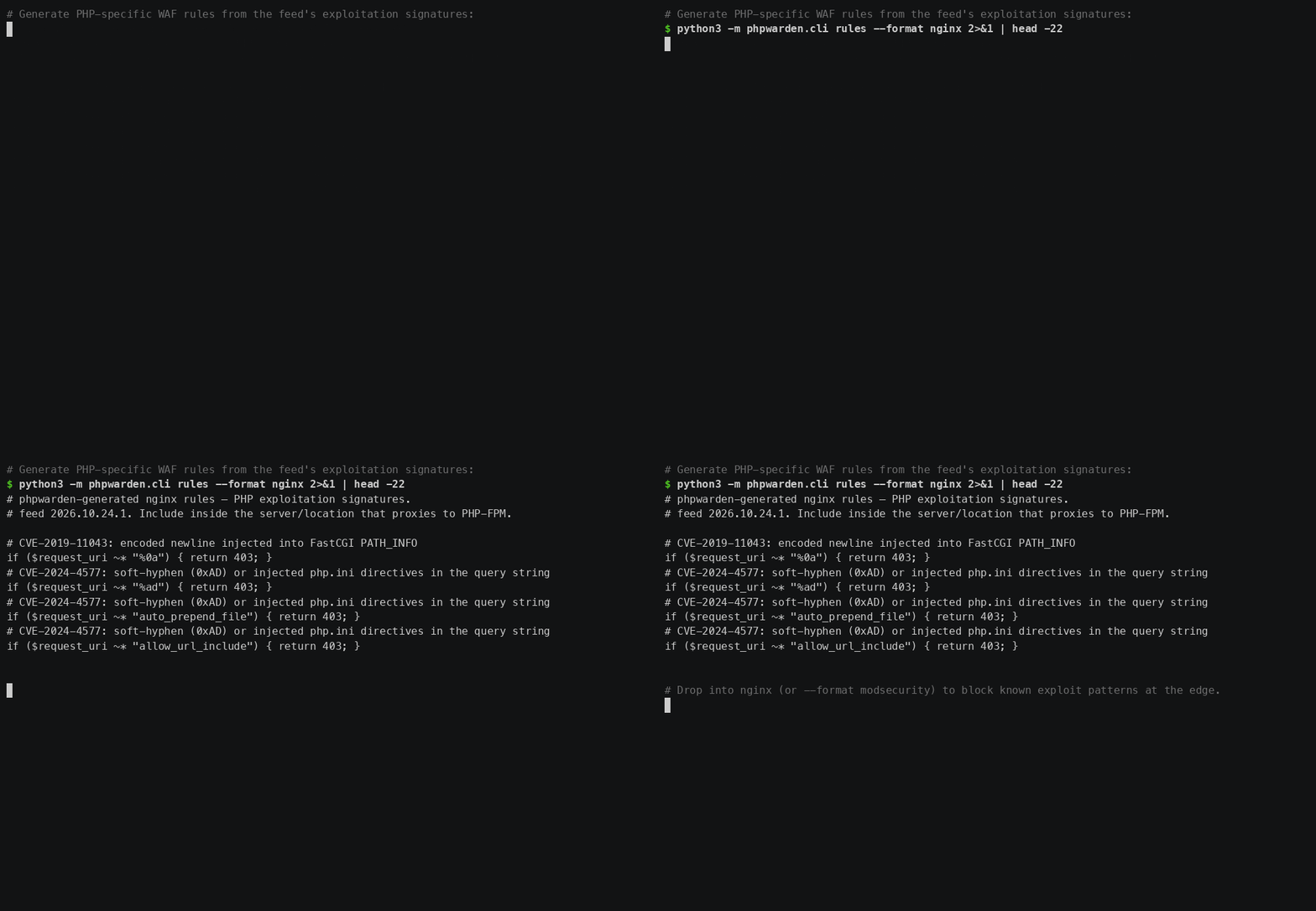
Try the rules before they block anything
Two ways to see what the rules would do first. --replay needs no change to your web server: it runs
the same signatures over an access log you already have and reports the requests that would have been refused.
$ phpwarden rules --replay /var/log/nginx/access.log
Replayed 6 log lines against the blocking rules (feed 2026.11.14.2): 3 request(s) would be blocked.
  CVE-2024-4577: 3 request(s)
      e.g. line 2: 198.51.100.9 - - [13/Nov/2026:10:00:00 +0000] "GET /index.php?%ADd+allow_url_include%3d1+... HTTP/1.1" 404 10
  top paths:   /index.php (3)
  top clients: 198.51.100.9 (3)
  None of the matching requests had been answered 2xx/3xx: no sign of false positives.
A probe normally gets a 404 or 403; a real page gets a 200. So the report counts how many of the matching
requests your server had answered with a 2xx or 3xx and tells you to check those first. Add --json
for a machine-readable report.
--dry-run generates the same rules in a log-only form to run on the live server for a few days:
$ phpwarden rules --format modsecurity --dry-run --out php-dryrun.conf
$ phpwarden rules --format nginx --dry-run
The ModSecurity rules use pass,log,auditlog instead of deny, and their messages start
with phpwarden DRY-RUN (would block). The nginx rules set a variable,
$phpwarden_would_block, instead of returning 403; the generated file shows the
log_format line that writes it to a log. When you are satisfied, generate the rules again without
--dry-run.
Fleet report report
What it does: takes the --json output of several scans (from many hosts) and merges
them into one self-contained HTML page you can open in a browser or email around. When to use it:
a quick, offline alternative to the hosted dashboard when you just want a shareable snapshot and don't
want to run a server.
$ phpwarden scan --json      > web1.json
$ phpwarden deps composer.lock --json > web1-deps.json
$ phpwarden report web1.json web1-deps.json --out fleet.html
Findings & ranking
phpwarden ranks exploitation-first. Something being attacked in the wild outranks a higher-CVSS vuln nobody is using. The sort order is:
- In the wild — listed in the CISA KEV catalog (known exploited).
- EPSS — FIRST's probability the CVE is exploited in the next 30 days.
- Severity then CVSS as tie-breakers.
| Marker | Meaning |
|---|---|
[EXPOSED] | A feed advisory applies to this host/version/SAPI. Act on it. |
[POSSIBLE] | May apply: it depends on a version or setting phpwarden could not see. |
[CLEARED] | Does not apply to this version, SAPI or OS. |
[OK] | No applicable advisory — you're on a fixed branch. |
KEV | Actively exploited (CISA Known Exploited Vulnerabilities). |
EPSS n% | Exploit-likelihood score; higher = more urgent. |
fix: x.y.z | The first fixed version on your release branch. |
The feed
The vulnerability feed is bundled with the package and works fully offline. Updating it is optional, and there are two channels:
| Channel | Needs | How fresh |
|---|---|---|
| Free weekly | Nothing. No key, no account. | A snapshot of the maintained feed, replaced once a week. A vulnerability newly listed as known exploited is released to this channel straight away, not held for the week. |
| Maintained | A license key (PHPWARDEN_LICENSE, Pro and Team) | Rebuilt twice a day from the upstream sources. |
$ phpwarden feed status
feed 2026.11.14.2 (community+osv+foph+nvd): 146 engine CVEs, 8817 Composer, 12330 WordPress (21293 total)
  source=bundled-community, license: none (free channel)

$ phpwarden feed update                          # no key: the free weekly snapshot
$ PHPWARDEN_LICENSE=... phpwarden feed update    # with a key: the maintained channel
Without a key, feed update downloads the weekly snapshot if it is newer than what you have. If the
server cannot be reached it says so and carries on with the feed you already have; that is not an error. Nothing
contacts the network unless you run feed update, and setting
PHPWARDEN_FREE_FEED_URL=off stops the no-key update from calling out at all.
Sources: OSV.dev (Packagist), FriendsOfPHP/security-advisories, NVD, the php-src release notes, CISA KEV and FIRST EPSS. How quickly known-exploited vulnerabilities reach the feed, and how that is checked in public, is on the coverage commitment page.
Status badge for your README
If you maintain a Composer package or a WordPress plugin or theme, you can show its vulnerability status in your README. The badge is an image served by phpwarden and updates itself from the maintained feed.
[](https://phpwarden.io/packages/VENDOR/NAME)| For | Address |
|---|---|
| Composer package | /badge/vendor/name.svg |
| WordPress plugin | /badge/wordpress-plugin/slug.svg |
| WordPress theme | /badge/wordpress-theme/slug.svg |
| One exact version | add ?v=1.2.3 |
Without a version the badge says what the advisory data supports about the package as a whole, for example
vulnerabilities fixed in 3.1.6+, exploited below 6.0.6 or unfixed vulnerability. With
?v= it checks that one version: no known vulnerabilities, 2 known vulnerabilities or
exploited vulnerability. It never says "secure": only what is known. Every package page shows its own
ready-to-copy snippet.
Feeds and the weekly email
To hear when a PHP, Composer or WordPress vulnerability is confirmed as exploited:
- Feed: Atom / RSS or JSON Feed, newest CISA listing first.
- Weekly email: sign up on the actively exploited page. One short email each Monday listing what was added that week. You confirm by clicking a link, and every email has an unsubscribe link.
Connect a project to the dashboard
- Sign up and verify your email, then open the app.
- Create a project — you get a one-time ingest token (
pw_live_…). Copy it; it's shown once. - Run any scan with
--report-toand--report-token(or setPHPWARDEN_REPORT_TOKEN).
$ export PHPWARDEN_REPORT_TOKEN=pw_live_xxxxxxxx
$ phpwarden scan --report-to https://app.phpwarden.io/v1/reports
$ phpwarden deps composer.lock --report-to https://app.phpwarden.io/v1/reports
Results appear on the project dashboard, ranked by exploitation, with history, trends and alerts.
Site inventory & remote updates
Once a WordPress site runs the phpwarden plugin, its project gets a Site & updates page (linked from the top of the project dashboard). It lists every plugin and theme on the site with the installed version, whether an update is waiting, and how many known vulnerabilities it has, with the exploited ones first.
Remote updates need the agency edition of the plugin; the standard plugin is report only. In the agency edition they are off by default. To allow them, the site's administrator ticks Allow the phpwarden dashboard to update plugins and themes on this site in the plugin's settings. Until then the page is read-only. When they are on:
- Update queues an update for one plugin or theme; Update all queues every waiting update on that site.
- Deactivate switches off a plugin that has a known vulnerability, for the case where there is no fix yet.
- Fleet → Updates across your sites lists each outdated plugin once, with a button to update it on every site that allows it.
A queued action runs on the site's next check-in: within about a minute after any plugin change on the site, and otherwise at its twice-daily report. The result (old version, new version, or the error) is shown under Recent actions and in the plugin's own log on the site.
Available on every plan; updating one plugin across several sites needs a plan with more than one project. View-only client logins can see the page but cannot queue actions.
Client reports
Every project has a Client report (the button next to Site & updates): a one-page summary written for someone who is not a security specialist. It says in one sentence whether anything on the site is being actively exploited, shows four numbers (actively exploited, likely to be exploited, total known vulnerabilities, updates waiting), and lists the 15 highest-priority items with the version that fixes each. When something was fixed in the last 30 days, a Fixed and verified section lists it with how it was confirmed: gone from a later scan of the same kind, or no longer visible from outside on a later live check (an exposed file needs a full, ownership-verified re-check). Nothing is listed as fixed until a re-check confirms it.
- Save as PDF: click Print or save as PDF on the report and choose "Save as PDF" in the browser's print dialog.
- Your name and logo (Pro, Team and Agency plans; Pro covers the PDF report): set them once under Settings → Agency & partner settings → Report branding (PNG or JPEG, up to 100 KB). Reports then say "Prepared by your agency using phpwarden".
- Scheduled email (Team and Agency plans): under Scheduled client reports, pick Weekly (sent Mondays) or Monthly (sent on the 1st) per project and list up to 10 recipients. The email carries the summary and a private link to the full report.
- Private link, no login: the emailed link opens the full report without an account and works for 35 days. Staff can also copy a private link from the top of any report to send by hand.
The report covers known vulnerabilities in installed software. It is not a malware scan or a firewall log, and it says so.
Team roles and client access
On the Team and Agency plans you invite staff under Settings → Team seats and clients under Settings → Agency & partner settings → Invite a client, then decide what each one can open under Who can see which site.
| Role | Sees | Can change |
|---|---|---|
| Owner | Every project | Everything, including billing, tokens and team access. |
| Staff — all sites | Every project | Finding status and assignee, discussion, remote updates. |
| Staff — assigned sites only | Only the projects you tick | The same, on those projects. |
| Client — view only | Only the projects you tick | Nothing. Clients can read the dashboard and the client report. |
Alert emails about newly exploited vulnerabilities go to the owner and to staff who can work on that project. Clients do not receive them, so you decide how and when a client hears about a problem.
Seats: the Team plan includes 5 staff seats and the Agency plan 10. Client logins are free and do not use a seat. A client who only needs the report does not need a login at all: send them the private link.
CI integration (GitHub Actions, GitLab, Bitbucket, pre-commit)
The phpwarden action installs the CLI,
scans on every push, and fails the build on what matters. Findings show up three ways without opening a
log: a job summary table with fix versions, pull-request annotations on the exact line of
composer.lock, and optionally SARIF in the GitHub Security tab.
name: phpwarden
on: [push, pull_request]
jobs:
  security:
    runs-on: ubuntu-latest
    steps:
      - uses: actions/checkout@v4
      - uses: oroma-alfred/phpwarden-action@v1
        with:
          fail-on: exploited           # or critical | high | medium | exposed | never
          report-url: https://app.phpwarden.io/v1/reports
report-token: ${{ secrets.PHPWARDEN_TOKEN }}| Input | Default | Meaning |
|---|---|---|
composer-lock | composer.lock | Lockfile to scan (empty to skip). |
wordpress-path | "" | WordPress root to scan (empty to skip). |
php-version | "" | Assess your production PHP version (e.g. 8.3.10) against engine CVEs; with sapi and os. |
fail-on | exposed | exposed (any finding), exploited (CISA KEV only), critical, high, medium, never. Severity thresholds still fail on anything in KEV. |
upload-sarif | false | Send findings to code scanning (needs security-events: write). |
reachability | true | Check whether vulnerable packages are referenced in your code. |
report-url | "" | Ingest URL (empty = local scan only). |
report-token | "" | Project token — store as a repo secret. |
Outputs findings, exploited, worst-severity, sarif-file and
failed are available to later steps. Full reference in the
action README.
Pre-commit hook
Catch a vulnerable composer.lock before it is even committed. The phpwarden repo ships a
pre-commit hook definition; it runs only when composer.lock is
staged and blocks the commit on any known-vulnerable package (exit 1). Add to .pre-commit-config.yaml:
repos:
  - repo: https://github.com/oroma-alfred/phpwarden
    rev: main             # pin to a tag with `pre-commit autoupdate`
    hooks:
      - id: phpwarden-deps
        # args: ["--no-reachability"]   # faster: skip the "is it referenced in code?" pass
Then pre-commit install once per clone. pre-commit builds phpwarden into its own isolated
Python environment, so nothing else on the machine changes.
GitLab CI
A ready-made job lives at
integrations/gitlab-ci/phpwarden.gitlab-ci.yml.
It keeps a JSON copy of the findings as an artifact and fails the pipeline only on a real verdict
(exit 1 vulnerable, 2 possibly exposed). Include it, or paste the job:
phpwarden:
  stage: test
  image: python:3.12-slim
  before_script:
    - pip install --quiet "phpwarden>=2,<3"
  script:
    - phpwarden deps composer.lock --json > phpwarden.json || true
    - phpwarden deps composer.lock          # exit code decides the job
    # add --report-to $PHPWARDEN_REPORT_TO with a masked PHPWARDEN_REPORT_TOKEN variable
  allow_failure: false
  artifacts:
    when: always
    paths: [phpwarden.json]
Bitbucket Pipelines
Same shape for Bitbucket; the full file with a reusable step anchor is at integrations/bitbucket/bitbucket-pipelines.yml.
image: python:3.12-slim
pipelines:
  default:
    - step:
        name: phpwarden
        caches: [pip]
        script:
          - pip install --quiet "phpwarden>=2,<3"
          - phpwarden deps composer.lock --json > phpwarden.json || true
          - phpwarden deps composer.lock    # exit 1 / 2 fail the step
        artifacts:
          - phpwarden.json
Both templates can also write SARIF. Any other CI runner works the same way: pip install "phpwarden>=2,<3", run
phpwarden deps composer.lock, and let the exit code gate the build.
Laravel 10, 11, 12 and 13 projects can also composer require --dev phpwarden/laravel and run
php artisan phpwarden:scan (same exit codes, plus --fail-on=exploited); see the
phpwarden/laravel package.
SARIF output
scan, deps, wordpress, probe and code take
--format sarif and print SARIF 2.1.0, the format GitHub code scanning and most CI dashboards read.
It carries the same findings as --json (--format json is the same as
--json), and the exit code does not change. A finding that is known exploited or has an EPSS of 50%
or more is always level error, whatever its CVSS. deps results point at the package's
line in composer.lock; code results point at the file, line and column.
# GitHub Actions, without the phpwarden action
      - run: pip install "phpwarden>=2.3,<3"
      - run: phpwarden deps composer.lock --format sarif > deps.sarif || true
      - run: phpwarden code . --format sarif > code.sarif || true
      - uses: github/codeql-action/upload-sarif@v3
        with: { sarif_file: deps.sarif, category: phpwarden-deps }
      - uses: github/codeql-action/upload-sarif@v3
        with: { sarif_file: code.sarif, category: phpwarden-code }
The job needs permissions: security-events: write. The
phpwarden action does the dependency upload for you with upload-sarif: true.
# GitLab CI: keep the SARIF files as job artifacts
  script:
    - phpwarden deps composer.lock --format sarif > phpwarden-deps.sarif || true
    - phpwarden code . --format sarif > phpwarden-code.sarif || true
    - phpwarden deps composer.lock        # exit code decides the job
  artifacts:
    when: always
    paths: [phpwarden-deps.sarif, phpwarden-code.sarif]
GitLab does not show SARIF in merge requests by itself, so there the files are artifacts for whatever you use to read SARIF, and the job's pass or fail still comes from the exit code.
phpwarden + Trivy
phpwarden covers PHP: the engine, Composer packages, WordPress and your own PHP code, ranked by exploitation. It does not look at container images, operating-system packages, JavaScript dependencies or infrastructure files. Trivy does, and it is free and open source. They fit in one job and both write SARIF:
      - run: pip install "phpwarden>=2.3,<3"
      - run: phpwarden deps composer.lock --format sarif > phpwarden.sarif || true
      - run: trivy fs --format sarif --output trivy.sarif .
      # for a built image: trivy image --format sarif --output trivy-image.sarif your/image:tag
      - uses: github/codeql-action/upload-sarif@v3
        with: { sarif_file: phpwarden.sarif, category: phpwarden }
      - uses: github/codeql-action/upload-sarif@v3
        with: { sarif_file: trivy.sarif, category: trivy }
Trivy also reads composer.lock, so some PHP packages will appear in both reports. Use phpwarden's
order to decide what to fix first in PHP, and Trivy for everything else in the image.
One ranked list (2.4.0). Give phpwarden Trivy's JSON and its findings join the PHP ones, ranked the same way: CISA KEV first, then EPSS, then severity. Pass the CISA catalogue and FIRST EPSS files to rank non-PHP CVEs by exploitation; without them the report says it ranked by severity only.
trivy fs --format json --output trivy.json .          # npm/JS, IaC, secrets
trivy image --format json --output image.json IMAGE   # OS packages in the image
phpwarden trivy-import trivy.json image.json --kev known_exploited_vulnerabilities.json --epss epss_scores-current.csv.gz
phpwarden assess . --trivy trivy.json --kev kev.json --epss epss.csv.gz
phpwarden assess . --run-trivy                         # runs trivy fs only if it is already installed
phpwarden trivy-import trivy.json --report-to https://app.phpwarden.io/v1/reports --report-token "$PHPWARDEN_REPORT_TOKEN"
Composer results inside a Trivy report are skipped (phpwarden deps covers them with
reachability). Secrets are listed by rule, file and line; the matched value is never read, stored or uploaded.
--baseline covers Trivy items too. phpwarden never downloads or installs Trivy.
Editor integrations
VS Code. An extension in the repository
(integrations/vscode) runs
the CLI you already have installed and shows the results in the Problems panel: vulnerable packages on their
line in composer.lock, and code findings in PHP files when you save. Install it from the
Visual Studio Marketplace:
$ code --install-extension phpwarden.phpwardenEverything runs on your machine; the extension uploads nothing.
PhpStorm. A plugin in the repository
(integrations/phpstorm-plugin,
PhpStorm 2024.2 or newer) does the same job as the VS Code extension: vulnerable packages marked in
composer.lock, code findings in PHP files, known-exploited ones as errors, and a quick fix
that copies the upgrade command. It is not on JetBrains Marketplace yet: build the zip as described in its README, then
Settings > Plugins > ⚙ > Install Plugin from Disk. It runs your installed CLI and uploads nothing.
If you would rather not install a plugin, you can run phpwarden as an External Tool; the steps are in
integrations/phpstorm.
Ingest API
All machine endpoints authenticate with the project ingest token as a Bearer credential, speak JSON,
and are served under the app origin (e.g. https://app.phpwarden.io).
| Endpoint | Auth | Purpose |
|---|---|---|
POST /v1/reports | Bearer token | Submit scan/deps/wordpress/detect JSON. |
GET /v1/findings | Bearer token | Current findings for the project. |
GET /v1/history | Bearer token | Per-report totals over time. |
POST /v1/shield/hits | Bearer token | Submit a shield hit summary (phpwarden shield report --json); client IP addresses are removed on arrival, only counts are kept. |
Authenticate every request with the header:
Authorization: Bearer pw_live_xxxxxxxxPOST /v1/reports
Body is the raw JSON from any phpwarden … --json command (scan, deps, wordpress or detect). On success
it stores the report and returns a summary. New actively-exploited (KEV) findings trigger an alert to the project owner.
# submit a scan result
$ phpwarden scan --json \
  | curl -s -X POST https://app.phpwarden.io/v1/reports \
      -H "Authorization: Bearer $PHPWARDEN_REPORT_TOKEN" \
      -H "Content-Type: application/json" --data-binary @-
Response 200
| Field | Type | Meaning |
|---|---|---|
ok | bool | Always true on success. |
report_id | string | ID of the stored report. |
source | string | Detected report type: engine, composer, wordpress or detect (a detect report returns stored, the number of attack log lines, and no report_id). |
stored | int | Number of findings persisted. |
new_kev | array | Newly-seen actively-exploited identifiers (empty if none). Drives alerts. |
{"ok": true, "report_id": "r_8f2a…", "source": "engine", "stored": 1, "new_kev": ["CVE-2026-109618"]}GET /v1/findings
Returns the current (latest-per-source) findings, pre-sorted exploitation-first.
$ curl -s https://app.phpwarden.io/v1/findings \
      -H "Authorization: Bearer $PHPWARDEN_REPORT_TOKEN"
Response 200 — {"findings": [ … ]}, each finding:
| Field | Type | Meaning |
|---|---|---|
source | string | engine / composer / wordpress. |
ident | string | CVE or advisory identifier. |
severity | string | critical / high / medium / low / unknown. |
cvss | number | CVSS base score (0 if unknown). |
epss | number|null | FIRST EPSS probability (0–1), or null. |
wild | bool | In the CISA KEV catalog (actively exploited). |
status | string | exposed or ok for this project. |
title | string | Human-readable summary. |
fixed | string | First fixed version on the release branch. |
GET /v1/history
Per-report totals over time (oldest first), for trend charts.
Response 200 — {"history": [ … ]}, each point:
| Field | Type | Meaning |
|---|---|---|
ts | int | Unix timestamp of the report. |
source | string | Report type. |
count | int | Total findings in that report. |
kev | int | How many were actively exploited. |
Errors
Errors return the HTTP status plus a JSON body {"error": "<code>"}.
| Status | Code | When |
|---|---|---|
| 401 | invalid_token | Missing or unknown Bearer token. |
| 400 | bad_json | Body is not valid JSON. |
| 402 | no_credits | Out of API calls. Each read call (findings, history) spends one credit; sending reports is free. Top up in the API tab, or subscribe to Pro for unlimited. |
| 413 | too_large | Request body exceeds the ingest size limit. |
| 429 | rate_limited | Too many requests — slow down and retry. |
| 404 | not_found | Unknown /v1 path. |
Outbound webhooks
(Pro and Team.) Add a webhook in API → Outbound webhooks and phpwarden will POST a signed JSON
event to your URL whenever a new actively-exploited (CISA KEV) finding appears in any of your
projects — so you can route alerts into Slack, PagerDuty, a SIEM, or your own automation.
Payload
{
  "type": "finding.kev",
  "ts": 1792850000,
  "project": { "id": "a1b2c3", "name": "Acme production" },
  "source": "engine",
  "idents": ["CVE-2026-109618", "CVE-2026-109619"],
  "message": "Newly actively-exploited (CISA KEV) in 'Acme production' (engine): …"
}
A "type": "ping" event is sent when you click Send test.
Verifying the signature
Every delivery carries an X-Phpwarden-Signature: t=<ts>,v1=<hmac> header. The
v1 value is HMAC-SHA256 of "<ts>.<raw-body>" keyed with your
webhook's signing secret (shown once when you create it). Reject anything that doesn't match, or whose
ts is stale.
# Python receiver
import hashlib, hmac, time
def verify(raw_body, header, secret):
    parts = dict(p.split("=",1) for p in header.split(","))
    signed = f"{parts['t']}.".encode() + raw_body
    expected = hmac.new(secret.encode(), signed, hashlib.sha256).hexdigest()
return hmac.compare_digest(expected, parts["v1"]) and abs(time.time()-int(parts["t"])) < 3002xx quickly and do slow work asynchronously.Partner API, embed widget and WHMCS
For hosts and resellers on the Team or Agency plan, or on per-server host pricing: create and manage a phpwarden project for each customer site from your own billing or control-panel system, and show a read-only security summary inside it.
Create a partner key under Settings → Agency & partner settings → Partner API. It is shown
once and starts with pwp_. Send it as Authorization: Bearer <key>. All requests and
responses are JSON.
| Request | What it does |
|---|---|
POST /v1/partner/projects | Create a project. Body: {"name": "...", "external_id": "..."}. Returns its id and ingest token. Repeating the call with the same external_id returns the existing project. |
GET /v1/partner/projects | List your projects with suspended, scanned, last_ts, findings and kev (actively exploited count). |
GET /v1/partner/projects/<id> | The same summary for one project. |
POST /v1/partner/projects/<id>/suspend | Stop accepting reports for the project. Its data is kept. |
POST /v1/partner/projects/<id>/unsuspend | Accept reports again. |
POST /v1/partner/projects/<id>/token | Issue a new ingest token. The old one stops working. |
POST /v1/partner/projects/<id>/embed | Get a widget address for an <iframe>. Optional body {"ttl": 3600} (seconds, at most 24 hours). |
DELETE /v1/partner/projects/<id> | Remove the project and its data. |
$ curl -s https://app.phpwarden.io/v1/partner/projects \
    -H "Authorization: Bearer $PHPWARDEN_PARTNER_KEY" \
    -H "Content-Type: application/json" \
    -d '{"name": "shop.example", "external_id": "service-1042"}'
Errors are {"error": "..."}: 401 invalid_key, 402 plan_limit (not on the Team
plan), 404 not_found (also returned for another account's project). A suspended project answers
403 suspended to the site agent and the CLI.
Embed widget
The address from /embed shows a compact, read-only summary for that one project: a status line,
the highest-priority findings and the time of the last scan. It needs no login, runs no scripts, and stops
working when its time limit passes, so request a fresh address each time you render the page.
<iframe src="https://app.phpwarden.io/embed/PROJECT_ID?t=..." width="100%" height="520"
        sandbox="allow-popups" style="border:0"></iframe>
WHMCS
A WHMCS server module is included in the integrations/whmcs folder. It creates a project when a service is activated, suspends and unsuspends it with the service, removes it on termination, and shows the widget in the client area. Setup steps are in that folder's README.
Runtime guard
A daemon (shipped in the package) that watches PHP-FPM for worker-poisoning (php2shell-class) attacks and
recycles a corrupted worker before it serves a second request — containment the scanners don't do. It
reads each pool's access + error logs, correlates a fatal/OOM on a worker PID with that same PID then
serving 5xx, and SIGTERMs it so the FPM master respawns a clean worker.
$ phpwarden-guard --config guard.config.json                 # dry-run by default
$ phpwarden-guard --config guard.config.json --mode ENFORCE --allow-enforce
$ phpwarden-guard --config guard.config.json --loop 5 --json      # check every 5 seconds, JSON lines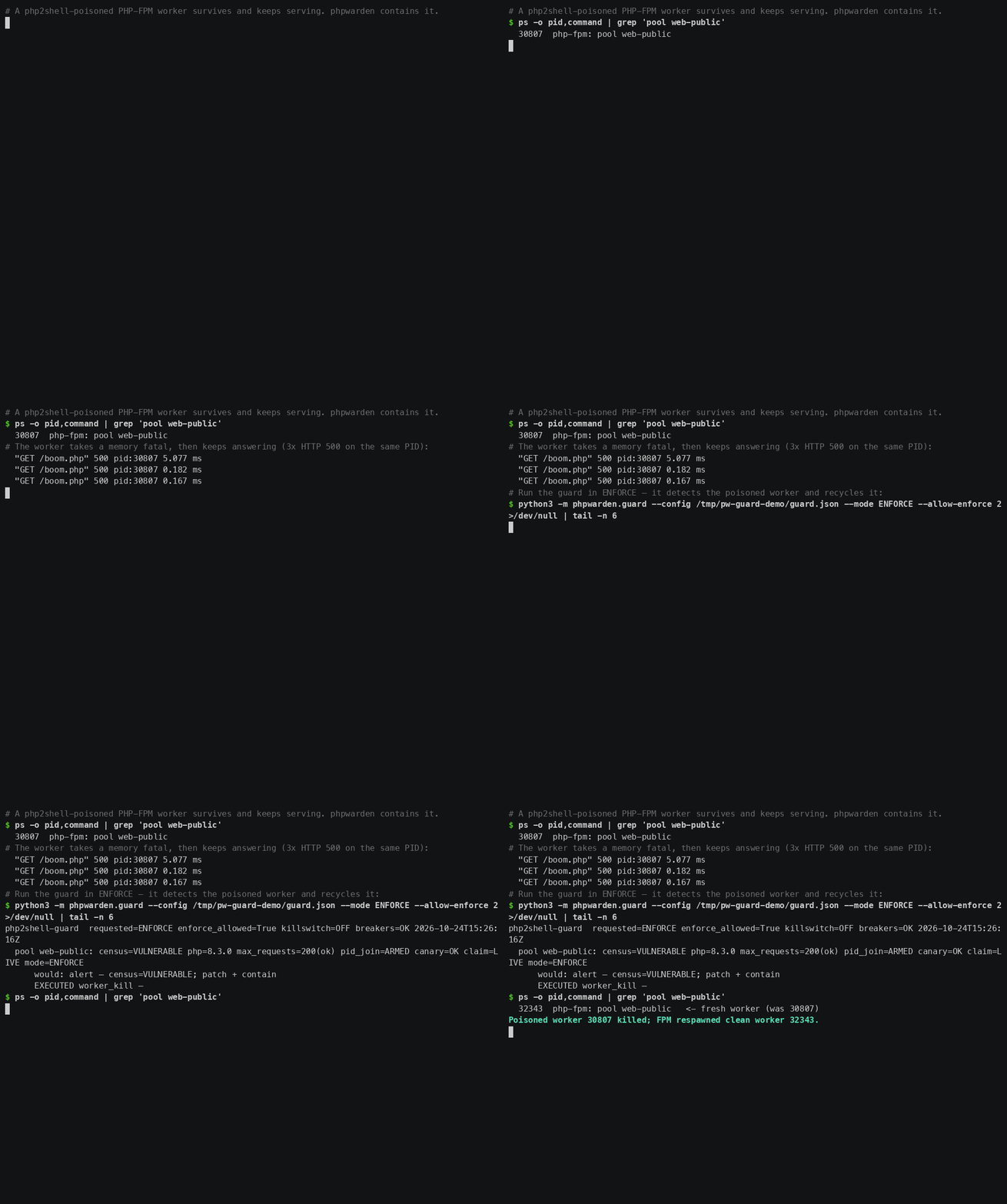
Troubleshooting & FAQ
zsh: command not found: $
You copied the example with the leading $ prompt. The $ isn't part of the
command — it just marks "type this in a shell." Run everything after it. (The Copy button on code
blocks here strips the $ for you.)
pip: command not found or error: externally-managed-environment
phpwarden is on PyPI;
these are your Python setup, not the package. On macOS pip is pip3, and a
system-wide install is blocked by PEP 668.
The fix is pipx install phpwarden (brew install pipx first on macOS), or a venv:
python3 -m venv v && v/bin/pip install phpwarden. No-install option: the single-file
python3 phpwarden.pyz scan. See Install.
It says php=unknown and everything is [POSSIBLE]
phpwarden couldn't find or run a php binary, so it can't confirm your version and won't claim
a definite verdict. Either install PHP, point at it with --php /path/to/php, or tell it the
version directly: phpwarden scan --version 8.3.12. With a known version the same findings
become a definite [EXPOSED] or [CLEARED].
The scan found nothing — is it working?
Very likely yes, and you're patched. 0 exposed with findings cleared is the goal.
To prove it's really checking, scan a deliberately-old version: phpwarden scan --version 8.3.0
should light up with the php2shell CVEs.
Can I run it with no internet / air-gapped?
Yes — that's a core design point. Every scan uses the feed bundled in the download; nothing is sent
anywhere. Only these need the network, and all are optional: --report-to (push results
to a dashboard) and phpwarden feed update (pull a newer feed: the free weekly snapshot, or the maintained channel
with a Pro or Team key), and two commands that by their nature talk to the network: probe (only to the site you point it
at) and integrity (checksums from wordpress.org). See
The feed.
Windows-only CVEs are showing on my Linux box (or vice-versa)
Detection uses the OS it auto-detected. If you're assessing a version for a different target, set it:
--os linux (or windows/darwin) and --sapi fpm. OS/SAPI-gated
advisories are then correctly cleared or kept.
The API returns 401 invalid_token
The Bearer token is missing, mistyped, or was rotated. Tokens are shown once at project creation; if you
lost it, rotate it in Settings and update --report-token / PHPWARDEN_REPORT_TOKEN.
See Ingest API.
Which command should I run?
Running PHP on a server → scan. Have a composer.lock →
deps. Running WordPress → wordpress. Only have the URL of a site you
manage → probe. Want your own PHP checked → code. Want it to block CI on a
finding → add any of them to CI. Suspect a WordPress site was tampered with →
integrity. Want to know whether someone is trying → detect. Want one
ranked answer across all of it → assess. Want exploits of what you run blocked inside PHP → shield. Want live attack containment →
runtime guard. You can run several and send them all to one dashboard.
Still stuck? Start free and open a project, or see the comparison on the home page.